
Advanced Features
Metrics
A metric is a named business measure with an agreed formula — "exception rate", "median turnaround", "open count". Once a metric is defined, the copilot computes it by exactly that formula every time, so the same question gets the same number no matter who asks it.
What Metrics answers
Every team has numbers it argues about, and the argument is rarely about the arithmetic. It is about the definition: what counts as an exception, which population, from which event to which. The Metrics page is where a project writes those definitions down, once, so the arguments stop.
Open Metrics from the project sidebar. Each project has its own set.
What a metric can be
Four kinds are supported, as the page itself lists under What you can define:
- How many — a count of the things matching a condition. "Define open count: the ones with no completion event yet."
- How much — the total, average, median, smallest or largest of a numeric attribute. "Define average value: the mean of a numeric attribute across the cohort."
- How long — the average, median, 90th or 95th percentile of the time between two events. "Define median turnaround: from event A to event B."
- A share or rate — one of the above divided by another, each side with its own condition, optionally scaled by a constant or by days in the period. "Define exception rate: the share that hit a given condition."
If the copilot cannot express what you asked for in one of these shapes, it says so and offers the standard form instead of improvising.
Defining one
Metrics are defined in conversation. Define a metric opens the Co-Pilot with the request started for you. Or simply ask a question that uses a named measure — "what's our exception rate?" — and the copilot will not guess: it proposes a definition in your own words and asks you to confirm it.
Nothing is saved until you confirm. A confirmed definition is saved as a draft, which is usable straight away, and appears on the Metrics page under Drafts.
The Metrics page
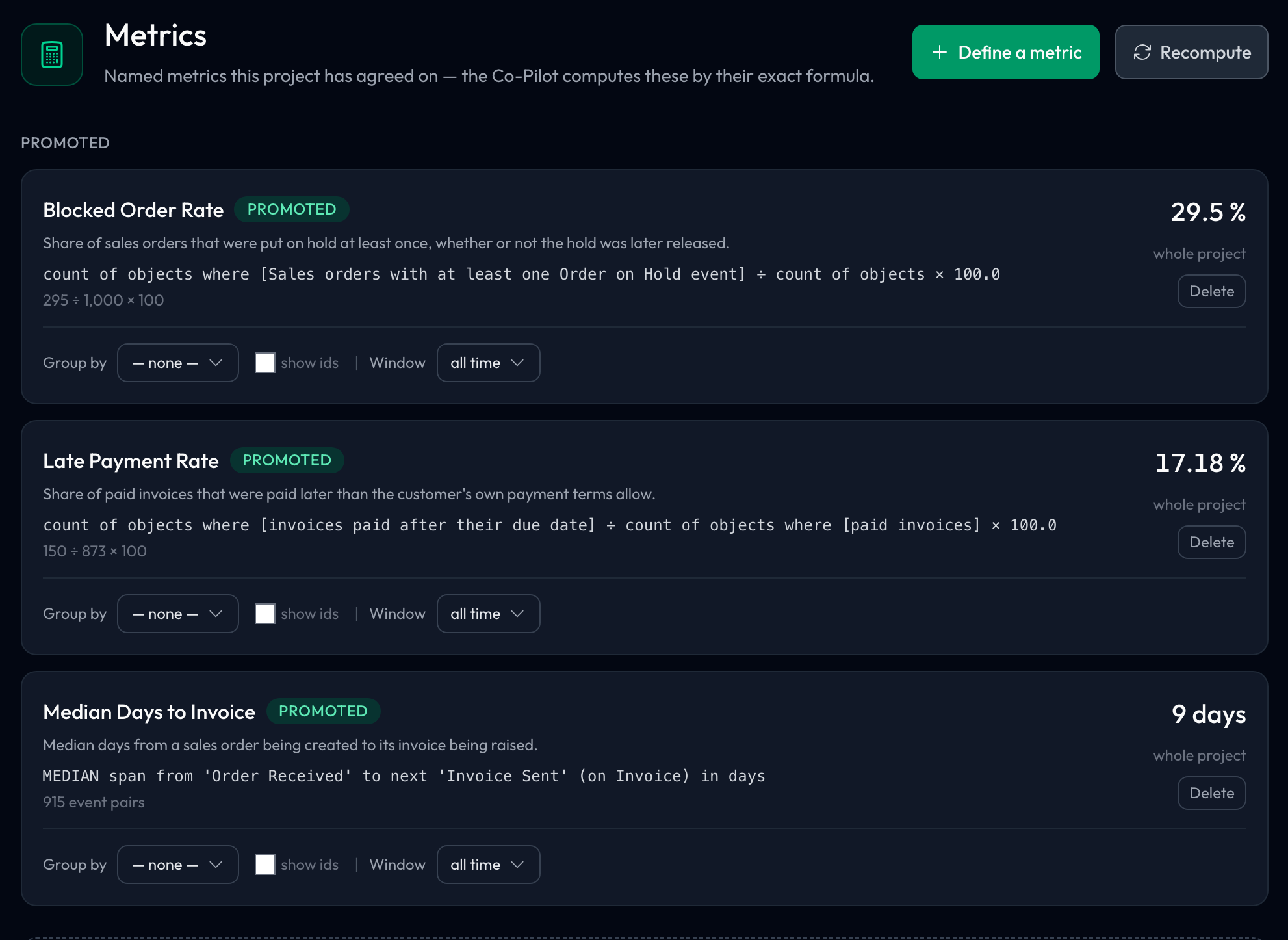
Metrics are listed in two groups, Promoted first, then Drafts. Each card shows the metric's name and status, a plain description, the formula, and its current value.
- Group by — break the value down by an attribute, one row per value. The attribute can be on the object itself or on a related object up to two links away (an order's customer region, say). Dates are bucketed into a time series and numbers into bins; categories can be sorted highest first, lowest first or A–Z. ID columns are hidden unless you tick show ids
- Window — compute it over the last 30 days, 90 days, 6 months, 12 months or 2 years
- Recompute — refresh the values
- A link back to the conversation the definition came from
- Promote (on drafts) and Delete
Values follow your filters
Like every other page in the project, Metrics answers to the filters in the header: active filters, a pinned filter, a selection and a crop. Each value is labelled with what it was computed over — whole project when nothing is on, otherwise the filters and the group size, such as 2 filters · 150 objects — and a Group by breakdown uses the same group as the value above it.
If a filter cannot be applied, the values are withheld and the page says which filter failed, rather than quietly showing unfiltered numbers.
Drafts, promotion and who can do what
A draft is usable by anyone in the project from the moment it is confirmed. Promoting a draft makes it the project's official reading of that measure. The page's own copy describes this as an admin's job.
Today the product is more permissive than that: while the feature is being tested, any project member can promote or delete a metric. Editing a definition directly, outside the copilot, needs a project admin. Treat promotion as the team decision it is meant to be.
Walkthrough: defining a turnaround measure
Neither example project in the Examples workspace has a metric defined yet, so the page opens on No metrics yet with the four kinds listed underneath. That is also the quickest way to start one.
- Open Order to Cash and go to Metrics.
- Click Define a metric. The copilot opens with the request begun.
- Describe the measure in your own words — for example, the median time an order spends blocked, from Order on Hold to Hold Released.
- Read the proposed definition: which events it measures between, over which orders. Confirm it, or say what to change.
- Go back to Metrics. The definition is under Drafts, with its value computed on whatever the header's filters select (the whole project, if none are on) and a link back to the conversation that defined it.
Working with the rest of the product
- With the copilot — definitions are made there, and used there: once a metric exists, asking about it by name gets that formula, applied to the conversation's cohort
- With enrichments — when a metric needs a value the data does not carry, define that value as an enrichment first, then measure it
- With the team — a promoted metric is the project's shared definition; see Collaboration
Next steps
- Co-Pilot — where metrics are defined and asked about
- Enrichments — the derived values a metric can be built on
- Collaboration — agreeing on definitions as a team
Agree the definition, not just the number
Most arguments about a KPI are arguments about its definition. Write it down here once, and the next meeting can be about what the number means rather than how it was worked out.