
Advanced Features
Enrichments
An enrichment is a derived attribute: a value your data does not carry directly, computed once from a formula and then written into the data, so every filter, chart and copilot answer can use it as if it had always been there.
What enrichments answer
Real questions often need a value that is not in any column. "Which invoices were paid late?" needs a due date, which needs the customer's payment terms, which live on the customer, two relations away. An enrichment works that out once, stores the result on every object, and from then on "paid late" is just an attribute.
Open Enrichments from the project sidebar. Each project has its own set.
What an enrichment can do
Seven kinds are supported:
- Read a value out of text — turn a text attribute with few distinct values into something usable, through a mapping table you can audit
- Bring a value across — copy or aggregate an attribute from a related object type, up to two hops away
- Shift a date — a date plus or minus a number of days, either constant or taken from another attribute
- Calculate a number — a numeric expression, including the number of days between two dates
- Take a timestamp from an event — the first or last time an event happened, as an attribute
- Band a number into labels — turn a numeric attribute into named ranges
- Mark true or false — a yes/no attribute from any filter condition
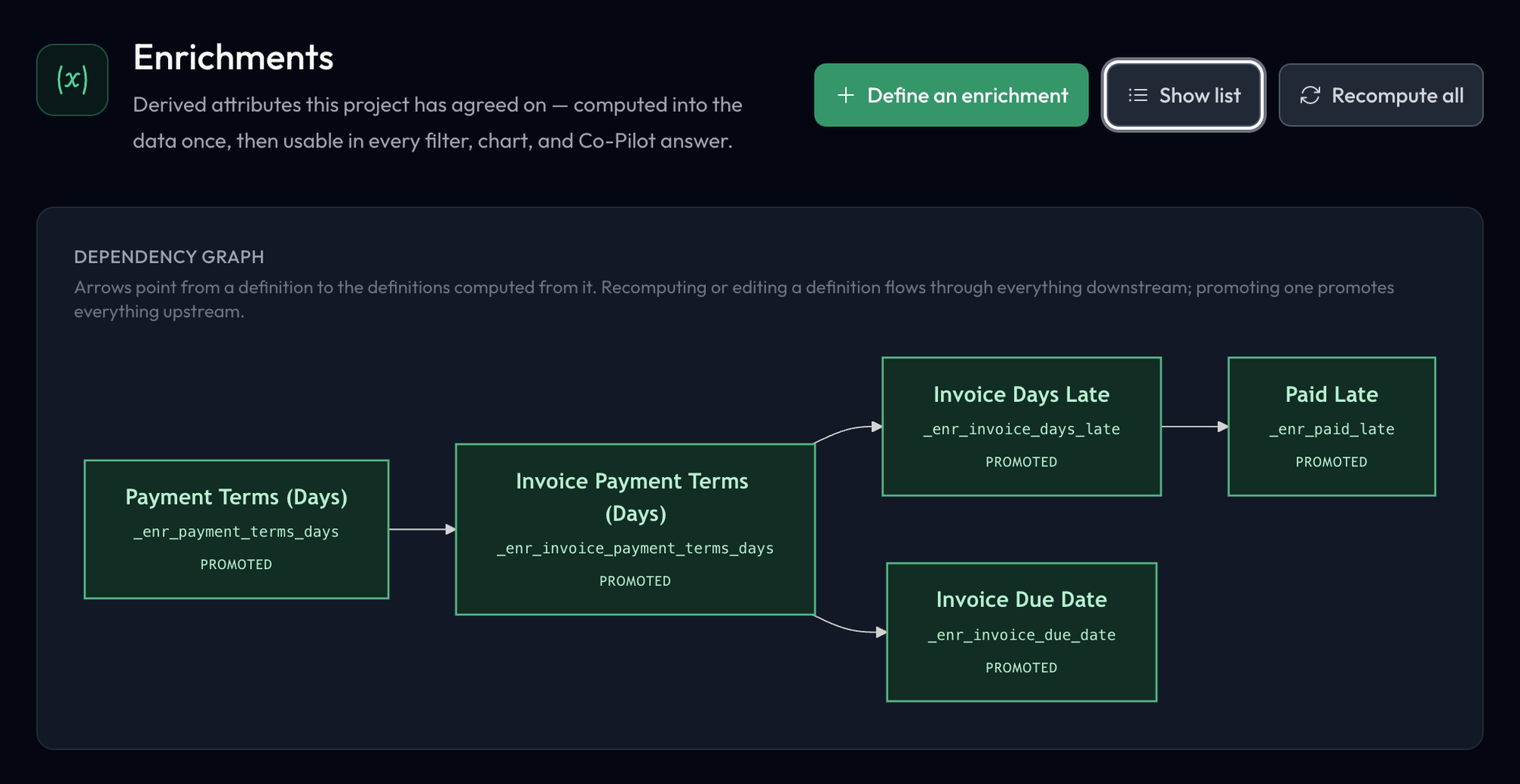
Enrichments can build on each other. That is how a chain like payment terms → due date → days late → paid late works: each step is its own enrichment, and each names the ones it depends on.
Defining one
Enrichments are defined in conversation. Define an enrichment opens the Co-Pilot with the request started for you; describe what you want in your own words.
The copilot proposes a definition — the formula, what it depends on, and a preview of the value — and asks you to confirm it. Nothing is saved until you do. If the value you want needs a chain of enrichments, it proposes the whole chain and asks once.
Once confirmed, the enrichment is saved as a draft and computed immediately, so it is usable in the same conversation. Drafts appear on the Enrichments page under Drafts.
The Enrichments page
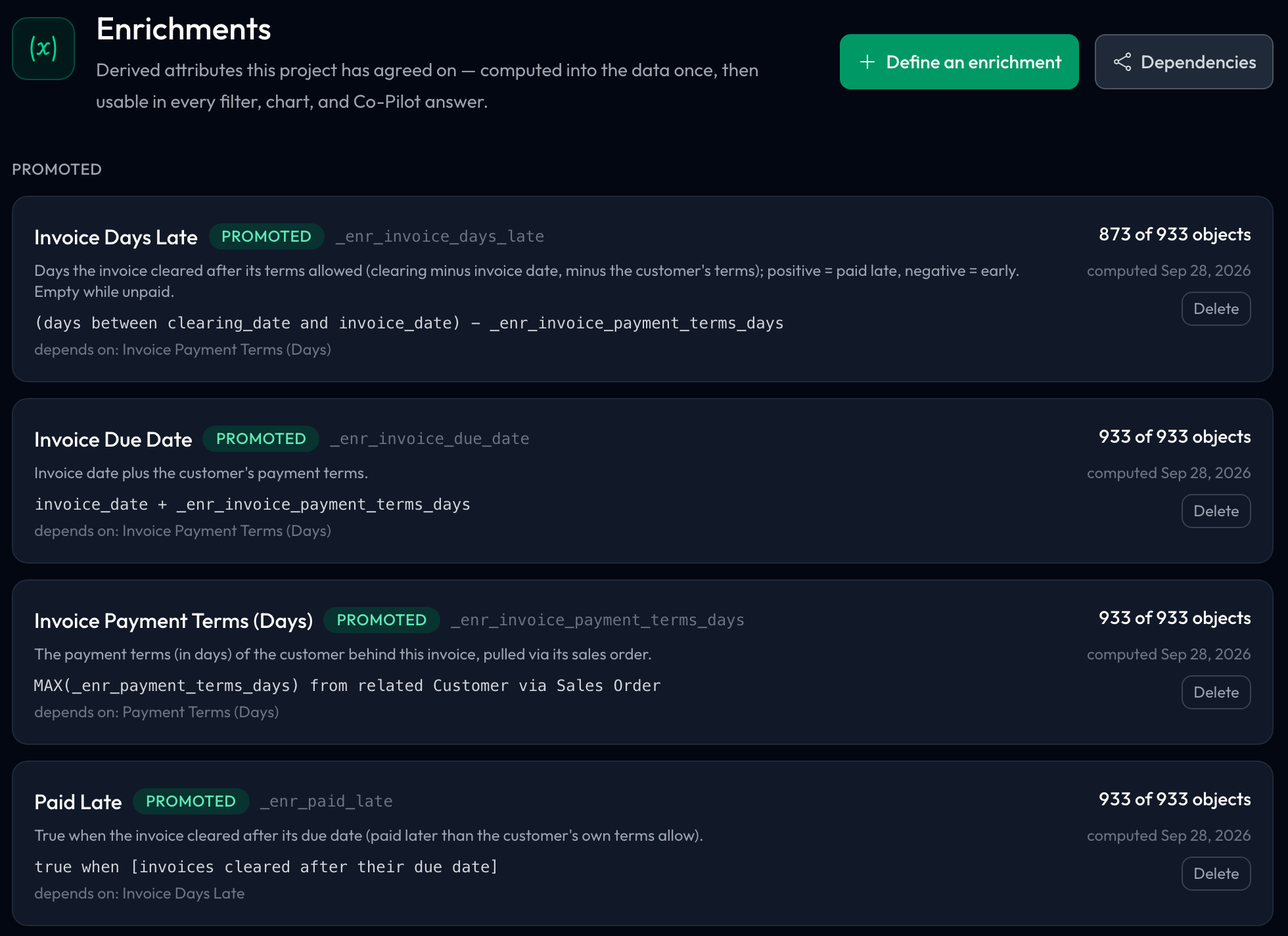
Enrichments are listed in two groups, Promoted first, then Drafts. Each card shows:
- The name, its status, and the attribute key it is stored under (for example
_enr_invoice_days_late) - A plain description, and the formula it computes
- Depends on — the enrichments it is built from
- Coverage — how many objects received a value, out of how many ("N of M objects")
- When it was last computed, and the error if the last computation failed
- A link back to the conversation it was defined in
- Promote (on drafts) and Delete, plus Retry when the last computation failed
In the header, Define an enrichment starts a new one and Dependencies switches the list for a graph of which enrichments build on which. There is nothing to recompute by hand: an enrichment computes when you save it, again when you edit it (with everything that depends on it), and after every data load.
On the Objects page, an enrichment's column is headed by its name with the (x) mark for enrichments (for example "(x) Invoice Days Late"); hover the header to see the formula. The object detail panel labels it the same way.
Drafts, promotion and who can do what
A draft is usable straight away, by anyone in the project. Promoting it makes it the project's agreed definition, which is the point: everyone asking about "days late" in this project then means the same formula.
Promotion carries the whole chain with it. A promoted value must never rest on a draft that someone could still change, so promoting an enrichment also promotes every enrichment it depends on.
- Any project member can define an enrichment through the copilot (it is saved as a draft), and can Retry one whose last computation failed
- Project admins are needed to promote, edit or delete an enrichment
Deleting an enrichment removes its values from the data, and an enrichment that others depend on cannot be deleted until they are. Demo visitors can read the page but cannot define or retry.
Filters and the lens
An enrichment is computed into the data, not recalculated per view, so it does not change when you apply a filter. What changes is which objects you are looking at: filter to a cohort and its enrichment values come with it.
Each enrichment belongs to one object type. It appears on that type wherever attributes appear — on Explore, in Compare's attribute cards, in the object explorer, in filters, and in copilot answers — labelled with the object type when it is not the lens.
Walkthrough: late payment in Order to Cash
In the Examples workspace, open Order to Cash and go to Enrichments.
- Under Promoted, the chain starts with Payment Terms (Days), which turns each customer's text payment terms into a number of days through a stored mapping, for every customer. Invoice Payment Terms (Days) brings that number across to each invoice via its sales order.
- Invoice Days Late takes the days between invoice and clearing, minus those terms; Invoice Due Date adds the terms to the invoice date. Paid Late is true when an invoice cleared after its due date.
- Each card's depends on line names the step before it. Invoice Days Late covers most invoices but not all: invoices that have not cleared yet have no value, and its description says so.
- Go to Compare, set Group A to the saved filter blocked at some point, and scroll to the attribute cards: Invoice · Enr Paid Late is there alongside the attributes that came with the data.
Next steps
- Co-Pilot — where enrichments are defined
- Metrics — the same agree-once idea, for named business measures
- Explore — look at an enrichment's distribution
- Filters & Exploration — filter on it like any other attribute
Compute it once, agree on it once
The value of an enrichment is not just that the number exists; it is that there is only one version of it. Promote the ones your team relies on, and "days late" stops meaning three different things in three different spreadsheets.